 NomadSwipe
6 Best Google Trips Alternatives in 2026
Google Trips is no longer available. Google shut the standalone app down in 2019 and moved its features into Google Search, Google Maps and google.com/travel. For a replacement, the right app depends on the job: Google Maps for saved places and offline map areas, Wanderlog or Tripomatic for itineraries, and NomadSwipe for a shortlist of real places on Android.
Google Trips was used to keep places for a trip and see them on a map. The six options below cover that job in different ways, from a card-based shortlist to a route planner for road trips.
Google Trips at a glance
- What happened. Google's post of 14 May 2019 said trip information would become “more accessible at google.com/travel, and in Google Search and Google Maps”, and that trip reservations would reach Google Maps. Support for the app ended on 5 August 2019.
- Where it went. Google said “many of your favorite features will live on in Google Search and Google Maps”, as reported by 9to5Google. Trip summaries on google.com/travel were set to end on 1 May 2023, according to 9to5Google.
- Offline. Coverage at the time said offline maps had not clearly carried over. Google Maps now lets you download map areas for offline use.
Quick comparison
| App | Best for | Starting price | Key difference | Jump |
|---|---|---|---|---|
| NomadSwipe | A shortlist of real places in a city, seen on a map | Free to download; optional Premium (Monthly or Lifetime) | Swipe to save, with no AI chat or booking step | Read |
| Google Maps | Saved lists of places and offline map areas | Not confirmed on the pages we read | Lists and offline areas, not an itinerary builder | Read |
| Wanderlog | Itineraries with email forwarding | Pro price not shown on the page read | Forward emails to add bookings to a trip | Read |
| Tripomatic | Day-by-day city itineraries with offline maps on Premium | Free plan with a monthly limit; Premium price not shown | Export to PDF, GPX or KML on Premium | Read |
| Roadtrippers | Road trips with stops along the route | Free ($0, 1 saved trip); Basic from $11.99 a month | Built for road trips rather than city swiping | Read |
| Polarsteps | A record of a trip as you go | Plus €8.99 a month or €29.99 a year | A travel record rather than a shortlist | Read |
1. NomadSwipe: for choosing places, not building a booked trip
Best for: travellers who want a shortlist of real places they chose themselves
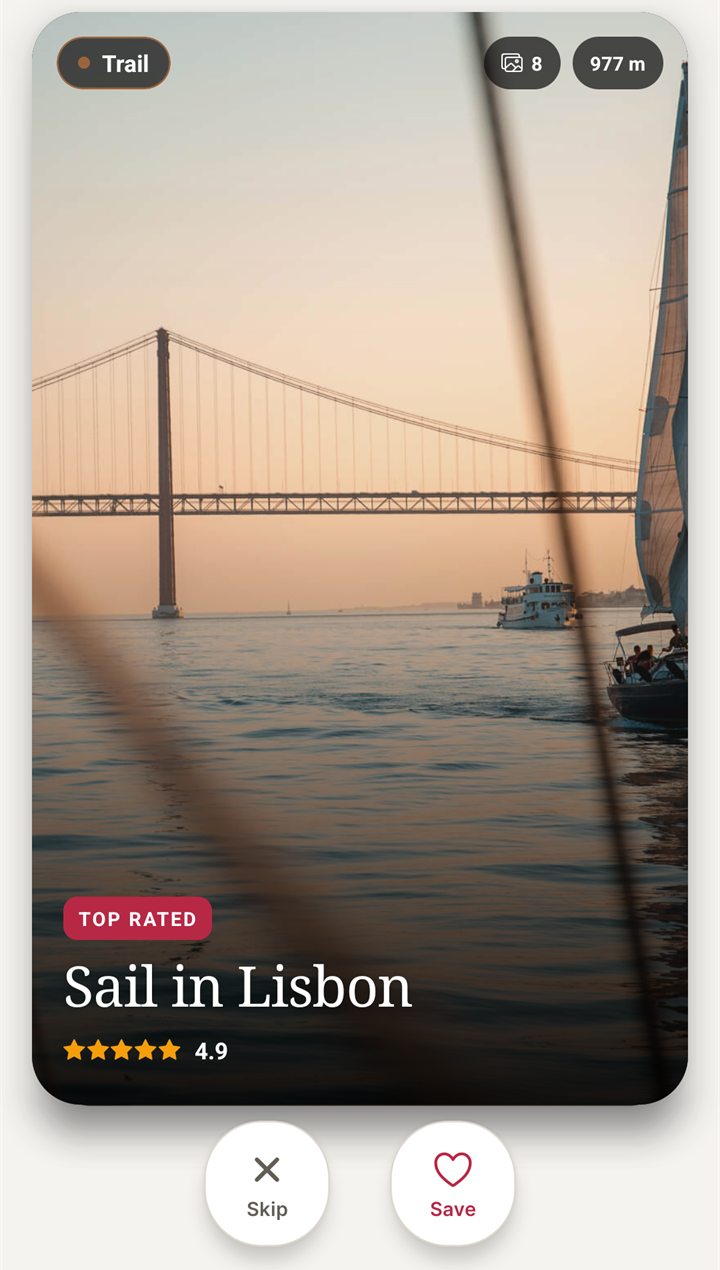
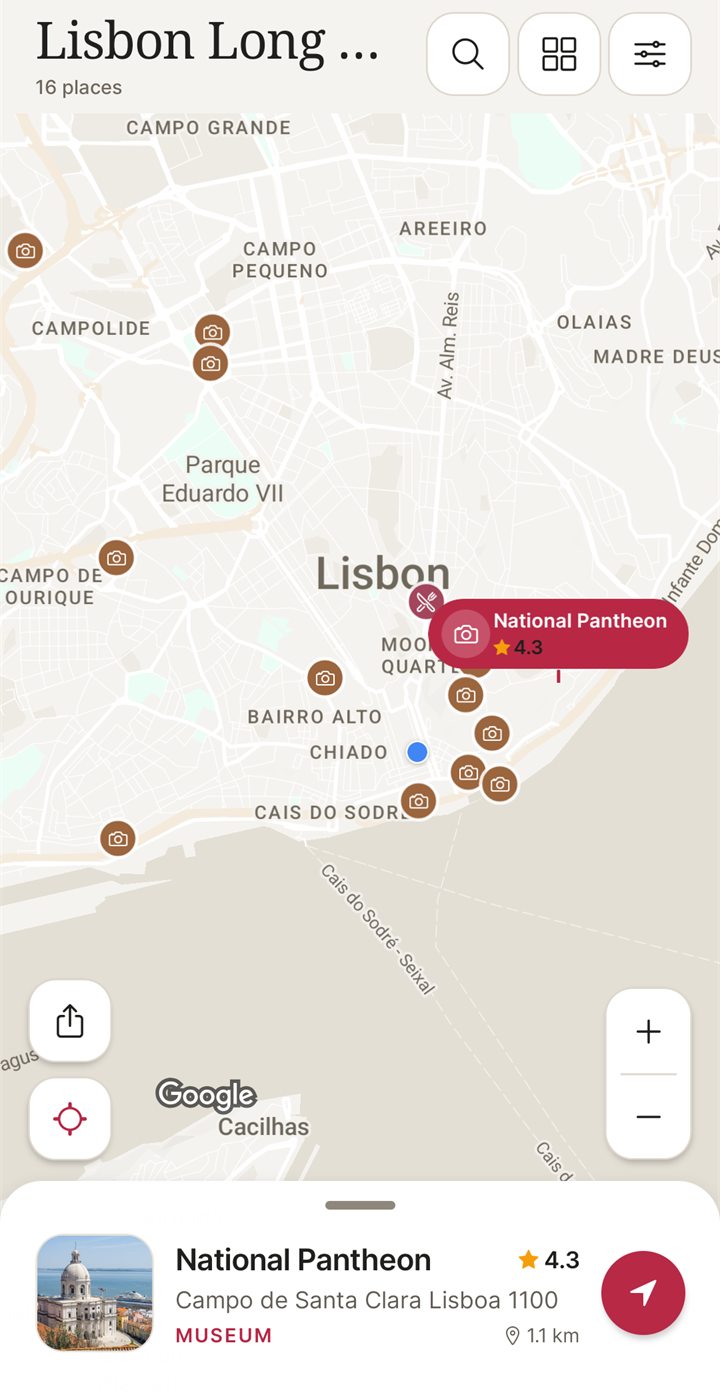
NomadSwipe is a trip planner for Android. You pick a city and it deals real places one card at a time. Swipe right or tap Save to keep a place, swipe left or tap Skip to pass. Everything you save lands in your trip and is pinned on a map, and the list view can be sorted by rating, distance or A to Z.

Where it fits the Google Trips job
- You decide each place yourself, one card at a time, and each saved place is pinned on the trip map.
- Each place shows its photos, directions, website and phone number, and you can sort saved places by rating, distance or A to Z.
- It is on Google Play for Android phones, and up to 20 saved trips are available offline.
Where it does not
- It does not write an itinerary from a conversation, and the Google Play listing does not describe bookings for flights, hotels or reservations.
- It is Android only. The free plan is limited to 3 trips, plus 2 destination searches and 2 custom pins a month, plus a limited number of swipes.
Pricing
Free to download on Android. Premium is optional, comes as Monthly or Lifetime, and removes the limits above. Google Play shows the current price before you pay.
NomadSwipe vs Google Trips, head to head
| NomadSwipe | Google Trips (discontinued) | |
|---|---|---|
| Status | Available on Google Play | Support ended 5 August 2019 |
| Finding places | Swipe through real places one card at a time | Things to do and saved places moved into Search and Maps |
| Bookings | Not described in the Google Play listing | Reservations were to reach Google Maps, per Google's May 2019 post |
| Offline | Up to 20 saved trips | Not clearly carried over, per 2019 coverage |
| Platforms | Android, on Google Play | Mobile app, no longer available |
| Price | Free to download; optional Premium | Not checked |
Google Trips cannot be installed today, so the useful comparison is what each replacement covers. Google Maps is the closer match for reservations, which Google moved there in 2019, and for offline map areas. NomadSwipe gives you a self-chosen shortlist of places on a map, on Android, with no booking step.
2. Google Maps
Best for: saved places and offline map areas in an app you already have
Google Maps lets you create a list of places, such as your favourite places or places you want to visit. A list can be kept private or shared by link for viewing or editing. You can also download map areas for offline use; the help page says offline maps must be updated before they expire.
- Strength: saved lists, shareable by link, and offline map areas in one app.
- Weakness: it is a map and navigation app rather than an itinerary builder. Its help pages do not say whether saved places work offline, so check before you travel.
Pricing: we did not confirm Google Maps' price on the pages we read. Check the Google Play listing before you install.
3. Wanderlog
Best for: itineraries with email forwarding
Wanderlog is a trip planner for itineraries and bookings. Its homepage says you can connect or forward your emails to add reservations to a trip plan, and it describes live syncing and collaborative editing for planning with others. It links to iPhone and Android apps and a web planner.
- Strength: email forwarding for reservations, and shared editing, in one planner.
- Weakness: the homepage we read shows no Pro price, so the cost of the paid tier is not confirmed here.
Pricing: check the app for current plans. Read our Mindtrip alternatives and Wanderlog alternatives comparisons for more.
4. Tripomatic
Best for: day-by-day city itineraries, with offline maps on Premium
Tripomatic lets you discover places, plan your day-by-day trip and navigate. Its homepage lists web apps and apps for iPhone and Android. Its free plan covers up to 5 days with planned activities per calendar month across all trips, and it shows ads.
- Strength: turns a list of places into a daily schedule, with offline maps and export to PDF, GPX or KML on Premium.
- Weakness: the free plan has a monthly day limit and shows ads. Premium prices are not shown on the page we read.
Pricing: a free plan with no time limit, subject to the monthly limit above. Premium removes the limits and ads.
5. Roadtrippers
Best for: road trips with stops along the route
Roadtrippers describes itself as a road trip planner that plans your trip for you. It has a web planner and apps for iPhone and Android, and its plans are shown in a comparison table on the homepage.
- Strength: a planner for routes and stops, with web and mobile apps.
- Weakness: the tool is built around road trips rather than city swiping, and the free plan allows 1 saved trip and 3 stops per trip.
Pricing: Free is $0 a year. Basic is $11.99 a month or $35.99 a year, with 3 saved trips and 20 stops per trip. Pro is $16.99 a month or $49.99 a year, with 5 saved trips and 50 stops. Premium is $19.99 a month or $59.99 a year, with unlimited saved trips and 150 stops.
6. Polarsteps
Best for: a record of a trip as you go, rather than a shortlist
Polarsteps offers a paid Plus tier. Its Plus page lists the prices below and says prices may vary by region.
- Strength: a good fit if keeping a record of the trip matters as much as planning it.
- Weakness: the Plus page does not describe offline use, place recommendations or bookings, so it does not replace a city shortlist or a booking tool.
Pricing: Plus costs €8.99 a month or €29.99 a year.
Which Google Trips alternative is right for you?
- You want saved places and offline map areas in an app you already use: Google Maps.
- You want a shortlist of real places on a map, on Android: NomadSwipe.
- You want itineraries with email forwarding: Wanderlog.
- You want a day-by-day city plan, with offline maps on Premium: Tripomatic.
- You want a road trip with stops along the route: Roadtrippers.
- You want a record of a trip as you go: Polarsteps.
FAQ
Is Google Trips still available?
No. Google shut down the standalone Trips app, and support ended on August 5, 2019.
Where did Google Trips features go?
Google said in May 2019 that trip information would move to google.com/travel and to Google Search and Google Maps, and that trip reservations would reach Google Maps.
Can Google Maps work offline for a trip?
Google Maps can download map areas for offline use. Its help page does not say whether saved places are available offline, so check before you travel.
Does NomadSwipe work offline?
Up to 20 saved trips are available offline, according to the Google Play listing.
Can NomadSwipe book flights or hotels?
The Google Play listing does not describe bookings. From a place's page you can get directions, visit its website or call ahead.
Does Tripomatic work offline or export itineraries?
Tripomatic's website says its Premium plan adds offline maps, usable without internet, and export to PDF, GPX and KML.
Want a free shortlist of real places? Swipe your way through a city on Android.
Get NomadSwipe on Google PlaySee also: Wanderlog alternatives · TripIt alternatives · Layla alternatives · Mindtrip alternatives · Roadtrippers alternatives · NomadSwipe home · All comparisons