 NomadSwipe
Free Itinerary Planner App: What Each Free Tier Includes
Most free itinerary planner apps are free until a specific limit: Roadtrippers allows 1 saved trip and 3 stops on its Free plan, Furkot asks $14 for a one-year Pass to keep editing trips, and Wanderlog lists offline access under Pro. This page sorts nine tools by where the limit is and whether they run online or as an app.
Each tool below was read from its own site or help page on 4 November 2026. Where a page showed no price or limit, the table says so instead of guessing.
At a glance
| Tool | Online or app | What the free tier gives you | Where the limit is |
|---|---|---|---|
| Wanderlog | Browser planner, plus iPhone and Android apps | Itinerary, map, reservations, budgeting and packing lists | Offline access, live flight updates, Gmail scanning and route optimization sit under Pro; price not shown |
| TripIt | Website and mobile app | Free sign-up; one itinerary from forwarded confirmation emails, sharing, calendar sync | TripIt Pro is $49 a year after a 30-day trial and adds flight alerts |
| Stippl | Full web app (no install), plus iPhone and Android apps | "Free forever"; plan a route and take it offline, per its homepage | Stippl Pro is in the site footer; no price or feature list shown |
| Layla | Web | Planning with no subscription or planning fee | You pay for the travel you book through Layla; suggested minimum budget €100 per person per night |
| Mindtrip | Web, plus an iPhone app (Android not mentioned on the pages read) | iPhone listing is marked Free | No plan or price on its homepage; the listing shows no in-app purchases |
| Furkot | Web only; add it to a phone's Home Screen | Planning costs nothing to start; basic GPX export is free | A Furkot Pass is $14 for 1 year; without one you can view a trip but not modify it |
| Roadtrippers | Web planner, plus iPhone and Android apps | Free plan: 1 saved trip, 3 stops | Basic, Pro and Premium raise the limits; 7-day trial on paid plans |
| Google Maps | Android, iPhone and computer | Lists of places you can save and share | No list limit stated on the help page; offline maps expire |
| NomadSwipe | Android app; iPhone coming soon | 3 trips, 2 searched places saved a month, 2 custom pins a month | A daily limit on saves; Premium (Monthly or Lifetime) lifts the limits |
Online trip planner tools: which run in a browser
If you want an online trip planner tool with nothing to install, these start in a browser. Stippl describes a full web app with no install. Wanderlog's "Start Planning a Trip" button opens a planner on its website, and Layla's site is where you chat with it. Furkot is web-based: its help page says it works on phones, tablets, laptops and desktops, and that on a phone you can use "Add to Home Screen" for an app-like view. Roadtrippers runs a web Trip Planner at maps.roadtrippers.com.
TripIt and Google Maps work on both: TripIt has a website and an app, and Google's help page for lists of places has separate steps for Android, iPhone and computer. Mindtrip also has a web version, and the only store link on the pages read was an iOS one. NomadSwipe is the odd one out: it is not an online planner at all, only an Android app for now.
Itinerary planner app free: where each free tier stops
Wanderlog: offline access is a Pro feature
The Wanderlog homepage is titled "free vacation planner and itinerary app" and lists an itinerary, map view, reservations, budgeting, packing checklists and travel guides. Under "Maximize your trip planning with Pro" it lists live flight updates, offline access, automatic Gmail scanning, route optimization and flight deals. No price is shown on the pages we could read; its /pricing page returned a 404.
Fits: a trip you plan on a laptop and look at on a phone with a connection. See our Wanderlog comparison for more.
TripIt: free for confirmations, Pro for alerts
TripIt's free page says you forward confirmation emails to plans@tripit.com and it builds a single itinerary. It also lists sharing, calendar sync and a place to add documents such as PDFs or QR codes. The Pro page lists real-time flight alerts and risk alerts, at $49 a year with a free 30-day trial.
Fits: trips made of flights and hotels you have already booked. It organizes plans; it does not suggest places. More in TripIt alternatives.
Stippl: free forever, Pro unexplained
The Stippl homepage says "Free forever. Plan your route, collaborate with friends, and take it all offline." and that browsing is "always free". It links to iPhone and Android apps as well as the web app. "Stippl Pro" appears in the footer, but the page gives no price and no list of Pro features, and its /pricing page loaded without prices.
Fits: anyone who wants an AI day-by-day plan without paying up front. See Stippl alternatives.
Layla: planning is free, booking is not
Layla's FAQ says "Yes, using Layla.ai to plan your trip is free, with no subscription or planning fee. If you book through Layla, you'll pay for the travel arrangements included in your booking." It adds a recommended minimum budget of €100 per person, per night. The page names a website, not an app store listing.
Fits: trips you intend to book through Layla. Details in Layla alternatives.
Mindtrip: no plan shown, listing marked Free
The Mindtrip homepage shows a "Get started" button and a "Get iOS app" link, and no pricing. Its Apple store listing shows "Free", says "and yes, it's totally free", and lists no in-app purchases. The listing says "Only for iPhone", and neither page mentioned Android.
Fits: an iPhone or browser user who wants AI suggestions. See Mindtrip alternatives.
Furkot: free to start, a Pass to keep editing
Furkot's Pass page says "You do not have to pay to start planning your trips with Furkot" and "Exporting trips in a basic GPX format is available to all users free of charge." A Pass is "valid for 1 year for $14". Without one, "you can continue to view your trip, but you will not be able to modify it." The Pass adds whole-trip map caching for offline use, terrain and satellite views, elevation profiles, expense tracking and printable turn-by-turn directions. The page gives no limit on the number of stops or trips.
Fits: road trips planned in a browser. See Furkot alternatives.
Roadtrippers: the clearest numbers
The Roadtrippers site lists four plans. Free is $0 a year and allows 1 saved trip and 3 stops per trip. Basic ($11.99 a month or $35.99 a year) allows 3 saved trips and 20 stops, Pro ($16.99 a month or $49.99 a year) allows 5 and 50, and Premium ($19.99 a month or $59.99 a year) allows unlimited saved trips and 150 stops. Paid plans have a 7-day free trial. The feature table lists navigation, offline maps and live traffic, but we could not tell which plan has which.
Fits: one road trip at a time. See Roadtrippers alternatives.
Google Maps: lists, not a schedule
Google's help page says you can create "a list of places, like your favorite places or places you want to visit", save places to it and share it, including inviting others to edit. It states no limit on lists or places. Its offline maps page says downloaded maps expire and must be updated, and that offline you get no transit, bicycling or walking directions. Neither page states a price.
Fits: keeping a pile of saved places on the map you already use. For the same idea with a trip layer, see planning a trip on a map.
NomadSwipe: where it sits
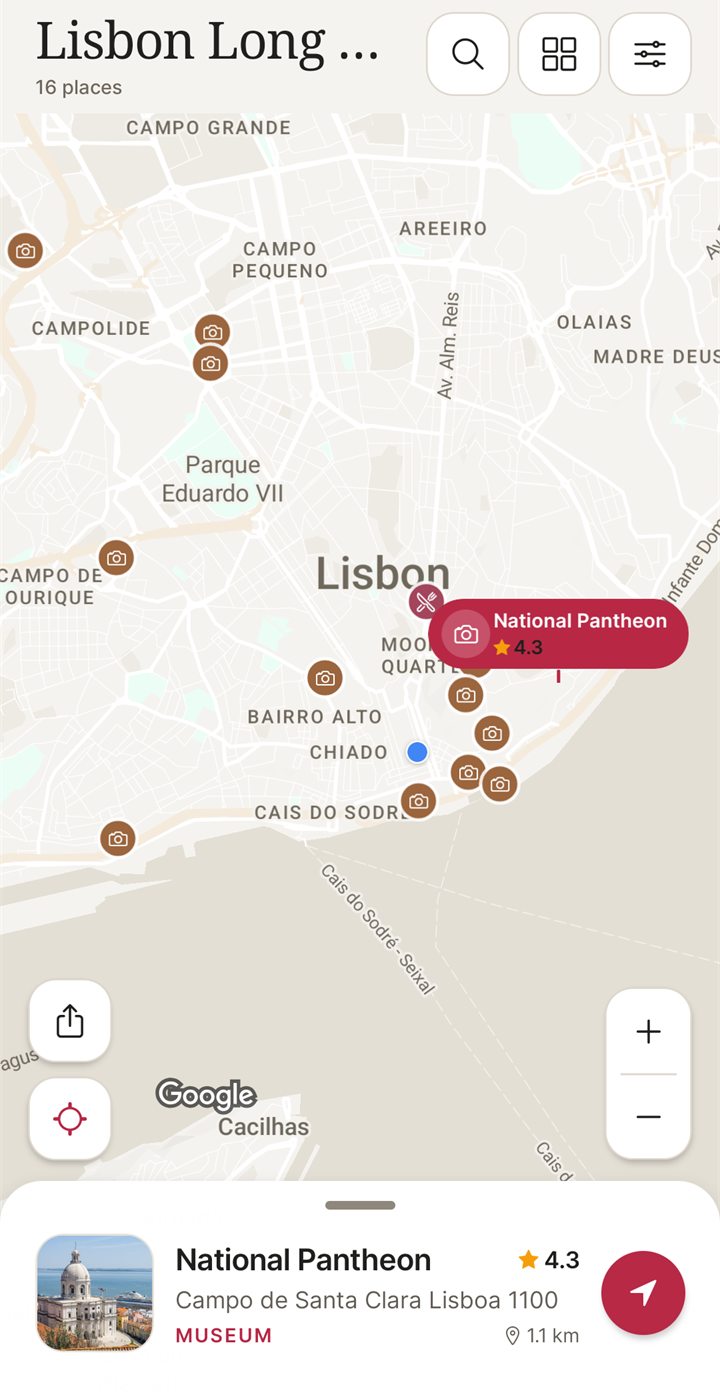
I built NomadSwipe, an Android app for choosing real places in one city by swiping yes or no, then seeing the places you kept on a map. Each card shows the category, rating, distance and whether the place is open, and the list sorts by rating, distance or A to Z. It does not build an itinerary: you plan each day yourself around the map.
The free plan has 3 trips, 2 searched places saved to a trip a month, 2 custom pins a month and a daily limit on saves. Premium (Monthly or Lifetime, bought in the app) lifts the limits. Premium keeps up to 20 saved trips available offline after you open them online; offline copies expire. It is Android only for now, and an iPhone version is coming soon.
How we checked
Facts about other tools come from their own sites, store listings and help pages, read on 4 November 2026. Where a page did not show a price or a limit, this page leaves it out. The NomadSwipe details come from our internal proof list, and we added no user numbers. Prices and limits change, so check the live page before you pay.
Which free tier to pick
- You want a browser tool and no install: Stippl, Furkot or Wanderlog.
- You want the limits spelled out in numbers: Roadtrippers.
- You have booking emails to gather: TripIt.
- You want to shortlist places in one city on Android: NomadSwipe.
- You already live in Google Maps: its lists, with offline maps downloaded before you travel.
For a wider comparison that is not organized by price, see the best trip planner apps in 2026, or swipe travel apps compared if choosing places is the hard part.
FAQ
What is the best free itinerary planner app?
There is no single best one, because the free tiers stop in different places. Roadtrippers caps its Free plan at 1 saved trip and 3 stops, TripIt's free sign-up covers booking confirmations, and Stippl's homepage says "Free forever". Pick the tool whose limit you are unlikely to hit.
Is there an online trip planner that is free with no limits?
None of the pages we read promises that for every feature. Stippl says "Free forever", Layla says planning has no subscription or planning fee but you pay for the travel you book through it, and Mindtrip's iPhone listing says "it's totally free". Each of them can still change, so check the current page before you rely on it.
Which online trip planner tools need no install?
Stippl describes a full web app with no install, Furkot runs in a browser and can be added to a phone's Home Screen, and Layla, Wanderlog, Roadtrippers and Mindtrip each have a web version as well. Google's help pages describe lists on a computer too.
Is NomadSwipe an online trip planner?
No. I built NomadSwipe, and it is an Android app. It is not a browser tool, and an iPhone version is coming soon. It also does not build an itinerary: it gives you a shortlist of real places in one city and a map of the ones you save.
Can Google Maps work as an itinerary planner app?
It can hold your places. Google's help page describes creating lists of places, saving places to them and sharing a list, but a list is not a day-by-day schedule. Its offline maps expire and, per the help page, give no transit, bicycling or walking directions offline.
Want to shortlist real places in a city? Swipe through them on Android.
Get NomadSwipe on Google PlaySee also: Best trip planner apps · Swipe travel apps · NomadSwipe home · All comparisons