 NomadSwipe
Google Maps Lists Alternatives: 5 Apps Compared (2026)
Google Maps lists keep a city's saved places inside the app you already use and can be shared by link, but Google's help pages state no list limit and do not say whether lists work offline. This page compares them with Mapstr, Wanderlog, Stippl and NomadSwipe, which I built.
If lists already do the job, stay with them. An alternative is worth a look when you want a different way to collect places, a trip-shaped view, or a place to start before you have a list at all. The table below sorts the five options by what a list-keeper usually checks first.
At a glance
| Option | List limits | Sharing | Notes | Offline | Map view | Platforms |
|---|---|---|---|---|---|---|
| Google Maps lists | None stated on the help pages | Private, or shared by link to view or edit | A description on the list and a comment on a saved place | Offline map areas exist; the lists pages do not say lists work offline | Lists show on your main map | Phone and computer |
| Mapstr | None stated on its homepage | Private or public map; shared editing; follow other users' maps | Comments and custom tags | Not mentioned on its homepage | Interactive map with proximity alerts | iPhone, Android and web |
| NomadSwipe | Free plan: 3 trips, 2 searched places saved to a trip a month, 2 custom pins a month, a daily limit on saves; Premium removes the limits | Not a feature I describe here | Not a feature I describe here | Up to 20 saved trips are available offline after you open them online; offline copies expire | Trip map plus a list that sorts by rating, distance or A to Z | Android; iPhone coming soon |
| Stippl | Not stated on its homepage | Plan a trip with friends, per its homepage | Times, places and notes in one timeline | "Take it all offline", with no detail given | Map every stop, with distances and travel times | iPhone, Android and web |
| Wanderlog | Not stated on its homepage | Live editing with friends, per its homepage | A customer quote on the homepage mentions schedule notes | "Offline access": download your trip plan and access it without an internet connection, per its homepage | Map view is a listed feature | iPhone and Android |
Google Maps lists vs the Maps app itself
When people search for "google maps lists vs maps", the useful distinction is between a place you saved and a place you plan around. Lists live inside Maps. They are a way to group places you save, and by default they show on your main map, with a More menu to hide or show each one. Saved places also appear in the You tab, where Google lists your own lists, lists you follow and a Maps section for My Maps files, which I did not test.
That is the strength and the limit. Everything sits next to search, directions and reviews, so there is nothing to install. But a list is a flat set of places with a name. Google's help page describes reordering places in a list, and the default lists (Favorites, Want to go, Starred places, Labeled and Travel plans) cannot have their icons changed. It does not describe days, times or a trip view. If you find that you are keeping a city trip in a list and still want a trip-shaped view, that is the gap the other four fill in different ways.
Google Maps lists
Best for: keeping saved places in the app you already open every day, and sharing one list with a link.
On Android you tap You, then New list, name it and choose Private ("Only you can view and edit") or Shared ("Share a link to view or edit"), according to Google's lists help page. You can invite editors, and viewers can see who added or edited places and notes. The computer version of the page says "Your comment appears in your saved list below the place", and that you cannot share starred places. Your saved places can be exported with Google Takeout by leaving Saved ticked.
The offline maps page covers downloaded map areas: navigation works if the whole route is inside the area, transit, bicycling and walking directions are unavailable offline, and the map expires unless it is updated. It does not say whether saved places or lists are available offline. The You tab page says you can search saved places by name or by a note you added.
- Strength: no extra app, lists sit on your main map, and sharing is a link.
- Limit: no limit is stated on the help pages I read, but neither does any page say lists work offline, so test yours in airplane mode.
- Limit: a list is not a trip. There are no days, and nothing suggests places you have not found yet.
Mapstr
Best for: collecting addresses from several sources, including Google Maps, onto one shareable map.
The Mapstr homepage is in French on the version I read. It says you can import your addresses from Google Maps and Foursquare, and another page covers Instagram and TikTok. You organize addresses on an interactive map, use custom tags and comments, choose a private or public map, and follow other users' maps. It offers proximity alerts near saved places and apps on Google Play and the App Store, plus a web version. The page does not mention offline use, list limits or a personal price. A "Mapstr pro" section is aimed at restaurants, hotels, bars and brands. For more on this one, see the Mapstr alternatives page.
- Strength: the closest to a Google Maps list with a Google Maps import.
- Limit: it holds what you already found. It does not help you discover places in a city.
NomadSwipe
Best for: starting a city's list from nothing, by swiping through real places and keeping the ones you like.
I built NomadSwipe, an Android app. You pick a city and it shows real places one card at a time. Each card shows the category, rating, distance and whether the place is open. The places you keep are pinned on a map for that trip, and the list view sorts by rating, distance or A to Z. The sample trip in the store screenshots is a long weekend in Lisbon with 16 places, all picked by swiping. You can also add custom pins and search for a destination.
The free plan covers 3 trips, 2 searched places saved to a trip a month, 2 custom pins a month and a daily limit on saves. Premium, Monthly or Lifetime, removes those limits. Separately, up to 20 saved trips are available offline after you open them online, and offline copies expire, so open a trip online again to refresh it.
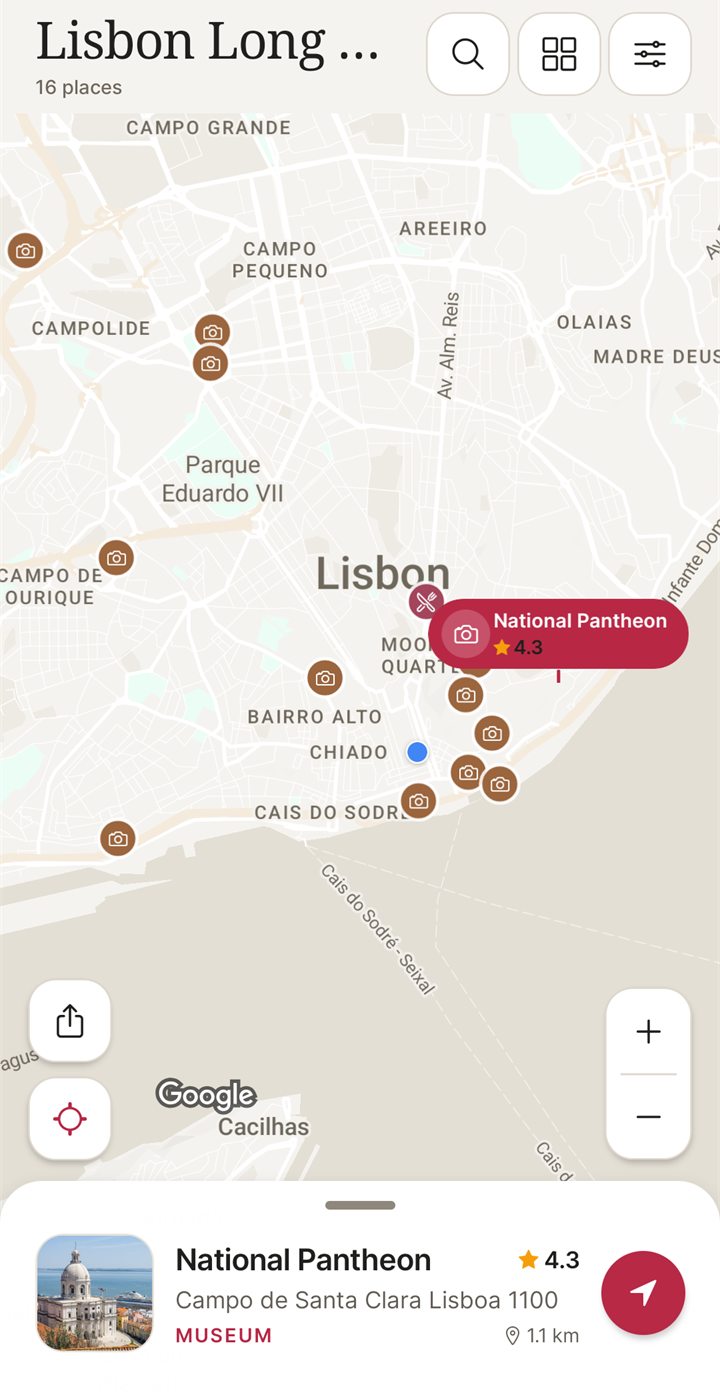
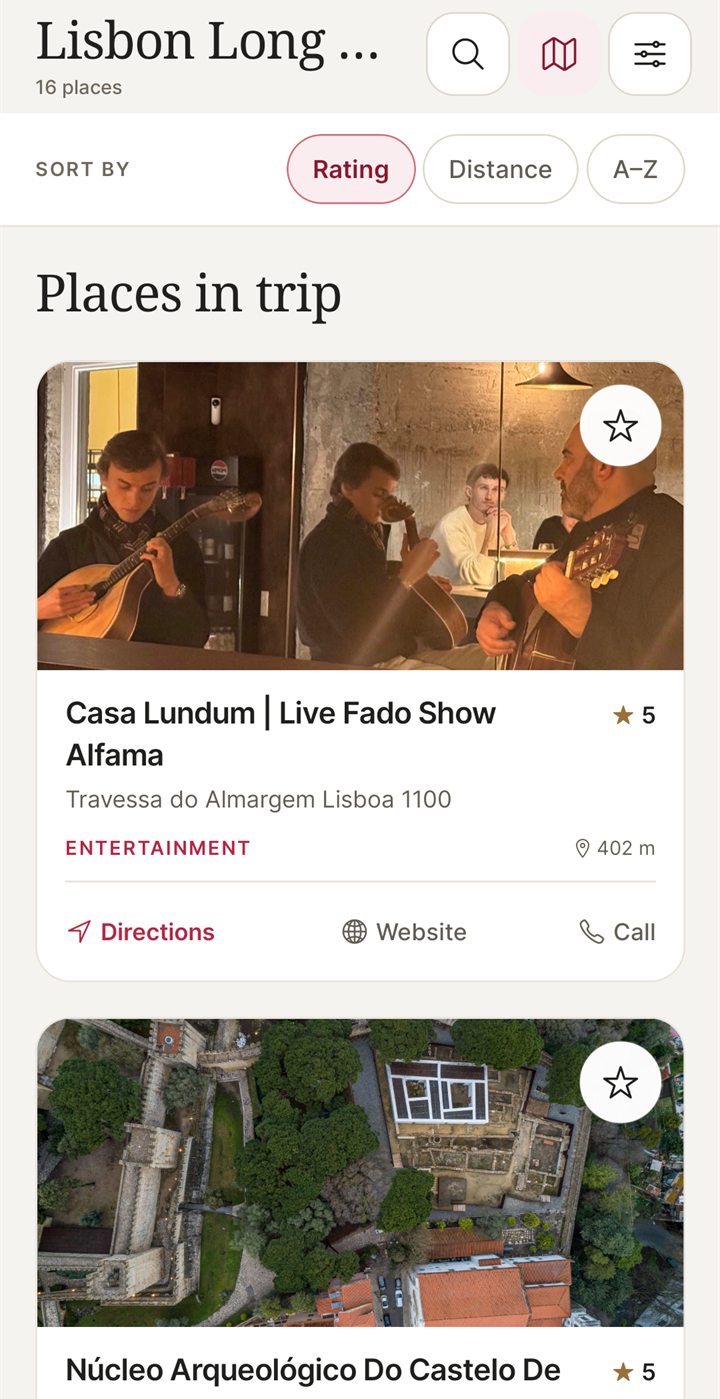
- Strength: a shortlist of places you chose yourself, before you have a plan, already on a map.
- Limit: it starts from a city, not from the list you already have, so it will not carry your Google Maps list across.
- Limit: Google Maps is stronger for sharing a list by link and for offline map areas.
- Limit: Android only for now. An iPhone version is coming soon.
Stippl
Best for: turning a set of places into a day-by-day timeline with a map and shared budgets.
The Stippl homepage lists apps on the App Store and Google Play and a web app with no install. It describes a timeline of times, places and notes, route planning that maps every stop with distances and travel times, planning a trip with friends, and a budget tracker that splits costs. It says the app is "Free forever" and that browsing community trips is "always free"; Stippl Pro is linked at the bottom of the page, but the page shows no price or limits. It says you can "take it all offline" without explaining what that covers. It does not mention importing Google Maps lists. More in the Stippl alternatives comparison.
- Strength: the most trip-shaped of the five, with days, times and notes.
- Limit: you rebuild the list by hand, since no import is described.
Wanderlog
Best for: an itinerary with a map that a group edits together.
The Wanderlog homepage shows App Store and Google Play badges, a map view feature and live collaborative editing. It lists "Offline access" and says "Download your trip plan and access it anytime, even without an internet connection." It does not give a full free-versus-Pro comparison, or mention list limits or importing Google Maps lists. A customer quote on the page says notes are used for schedule details. See the Wanderlog alternatives page for a deeper comparison.
- Strength: a shared itinerary with a map, for a trip several people are building.
- Limit: more tool than a simple saved list needs, and the homepage does not spell out which features need Pro, so check that before you rely on it.
Which to pick
- You want to keep a few favourite places and share one link: stay with Google Maps lists.
- You have addresses scattered across Google Maps, social posts and other apps: Mapstr, starting with one list to test its import.
- You have no list yet and want to pick places in a city on Android: NomadSwipe.
- You want days, times and notes in one timeline: Stippl.
- A group is editing one itinerary: Wanderlog.
For a wider view, see the nine trip planner apps compared, what replaced Google Trips, how to plan a trip on a map or how to find things to do in a new city.
How I checked
On 4 November 2026 I read four Google Maps help pages (lists on Android, lists on a computer, offline maps and the You tab) and the homepages of Mapstr, Stippl and Wanderlog. Where a page said nothing, the table says so rather than guessing, and it does not mean the feature is missing. I did not install or test the other apps, and I did not test Mapstr's Google Maps import. For NomadSwipe, the facts come from my own app and its Google Play listing, and I added no user numbers.
FAQ
Do Google Maps lists have a limit?
The two Google Maps help pages I read on 4 November 2026 (the Android and computer versions of the lists page) state no limit on the number of lists or places in a list. That is not proof that no limit exists, so check in the app if you plan a very long list.
Do Google Maps lists work offline?
Google's help pages do not say. The offline maps page covers downloaded map areas and navigation inside them, and the lists page does not mention offline use. Test your own list in airplane mode before you travel.
Can I move my Google Maps lists to another app?
You can export saved places from Google Takeout by ticking Saved. Mapstr's website says you can import addresses from Google Maps. I have not tested that import, so try it with one list first.
Is NomadSwipe a Google Maps lists replacement?
Only for one job: choosing places in a city and keeping the ones you pick on a trip map. I built NomadSwipe, and it does not replace the lists you share by link or the offline map areas in Google Maps.
Is NomadSwipe on iPhone?
Not yet. NomadSwipe is Android only today, and an iPhone version is coming soon.
Want to start a city's places from scratch? Swipe through them on Android.
Get NomadSwipe on Google PlaySee also: Swipe travel apps compared · NomadSwipe home · All comparisons