 NomadSwipe
How to use Travel Mapper in 6 steps
How to use Travel Mapper: install its Google Sheets add-on, open a new sheet, choose Extensions, Travel Mapper, Start Here, Generate Template, then fill in the itinerary, add places and update the map. The basic template is free. Premium covers the map, place search and Google My Maps export. This page covers Blue Planit's Travel Mapper, the one its own pages call a Google Sheets add-on.
Key facts
- What it is: a trip-planning tool that puts an itinerary template and a map inside Google Sheets. Blue Planit's FAQ says Travel Mapper includes a web app, the Sheets add-on and a Chrome extension.
- Where to start: Extensions, then Travel Mapper, then Start Here, then Generate Template, in a new Google Sheet (Marketplace listing).
- Free part: the itinerary template, split-costs sheet, packing and to-do lists, unlimited itineraries and the Chrome extension, per the pricing page.
- Paid part: the in-sheet map, place search, drag and drop, custom categories, Google My Maps export and itinerary email, listed at 2 dollars a month billed yearly. The Marketplace listing adds a 7-day free trial.
- Where your data lives: in your own Google Sheets; the pricing page says only your email address is saved on Blue Planit's servers.
- On a phone: through the web version, an emailed itinerary or an export to Google My Maps, per its FAQ.
The 6 steps at a glance
| Step | What you do | Where Travel Mapper says so |
|---|---|---|
| 1. Choose a version | Sheets add-on, web app, or both; the add-on and web app are interchangeable | Pricing FAQ: "What is Travel Mapper?" |
| 2. Install and sign in | Install from the Marketplace with your default Google account | Marketplace listing; support page |
| 3. Generate the template | Extensions, Travel Mapper, Start Here, Generate Template | Marketplace listing |
| 4. Add places | Type them in, use the add-on's place search, or save them from any website with the Chrome extension | Marketplace listing; Chrome Web Store listing; pricing page |
| 5. Update the map | Plot places, filter by day and category, drag to reorder | Marketplace listing; pricing page |
| 6. Take it on the trip | Export to Google My Maps, email the itinerary, split costs | Marketplace listing; pricing FAQ |
What Travel Mapper is, from its own pages
The Google Workspace Marketplace listing, which showed a listing update date of 5 May 2026, describes Travel Mapper as an add-on that lets you "plan trips using an intuitive itinerary template with a built-in dynamic Google Map". It is by Blue Planit. The pricing page FAQ says the product has three parts: the blueplanit.co web app, the Google Sheets add-on and a Chrome extension, and that the web app and the add-on are interchangeable while the extension is an accessory. So the answer to "how do I use it" depends on whether you want to work inside a spreadsheet or in the web app. The steps below follow the spreadsheet route because that is the one the Marketplace listing describes in detail.
Step by step
-
1. Choose the version you want.
Blue Planit's get started page gives three steps for the paid route: sign in to Google, buy the premium version, then log in to plan or install the add-on for Google Sheets. It also says "Not ready to buy? Try Travel Mapper out for free (no credit card needed)". The Marketplace listing says use of the basic itinerary template is always free and that there is a 7-day free trial of all premium features after installation. The web app lives at blueplanit.co/travel-mapper; when I loaded that address signed out, it asked me to sign in.
-
2. Install the add-on and sign in with your default Google account.
Install Travel Mapper from the Marketplace. One detail from the support page is easy to miss: if your browser is signed in to several Google accounts, the add-on attaches to your default account, and Google does not let the other accounts use it. Its fixes are to reinstall the add-on while your default account is the active one, or to sign out of all accounts and sign back in with the account you installed it with. The pricing FAQ adds that a paid subscription is linked to the Google account you used to install and authorize Travel Mapper. During install, Google shows a permission list. Blue Planit explains each item on its permissions page, including that sending email as you is used only by the Email Trip Summary feature and only when you click the button. That page is dated 4 November 2021, so the permission wording may have moved on.
-
3. Generate the template.
The Marketplace listing gives the exact path: open a new Google Sheets file and choose Extensions, Travel Mapper, Start Here, Generate Template. The listing says one click generates an itinerary, a to-do list, a packing checklist and a split-costs sheet. If the template will not generate, the listing points to the support page from step 2. Because everything is a normal Google Sheet, the pricing page lists sharing and collaboration through Google Sheets as part of the free plan, so you can invite travel companions the way you would share any sheet.
-
4. Add your places.
There are three routes in the pages I read. First, type activities straight into the sheet. Second, use the add-on: the pricing page lists "Search places, instantly plot on map", and the Marketplace change log mentions an "Add place" fix, adding a place from the sidebar, and an Explore modal with hotel search and restaurant suggestions. Those are change-log lines, not a how-to, so I cannot tell you the exact buttons. Third, the free Chrome extension: per its Chrome Web Store listing, you highlight text on a travel site, right-click and select Save to Itinerary, or press Ctrl+Shift+S on Windows or Cmd+Shift+S on a Mac. The listing says it adds the address automatically "whenever possible" and shows 2,000 users. The pricing FAQ says only Google Chrome is supported.
-
5. Update the map and shape the plan.
The Marketplace listing says the map lets you color code, map and filter activities, lodging and points of interest by day and category, and that one click plots your activities with markers. The change log mentions an "Update Map" button, so expect to refresh the map after you add or change places. The Marketplace page lists drag and drop for rearranging the itinerary among its core features, and the pricing table marks it, like the map and custom categories, as First Class only, so expect it behind the paywall or the trial. A known issue on the support page: after you click one Google Map marker, the other itinerary markers can stop responding, and its quick fix is to re-open the map from the dropdown menu. That page is dated January 2022, so I cannot say it still happens.
-
6. Take it on the trip.
Three exits are described. Google My Maps export: the listing says you import the Travel Mapper export file into Google My Maps and use it on the trip, and the pricing page says it works with the Google Maps mobile app. Email: the Email Itinerary Summary sends a consolidated message with auto-generated Google Maps links. Costs: the split-costs sheet divides expenses after the trip. The pricing FAQ says mobile planning is available through the web version, so the phone route is the web app, the emailed itinerary or My Maps. If you rely on a map without signal, read whether Google My Maps works offline first, since the export lands there.
What costs money, as the pages describe it
| Feature | Free | First Class (2 dollars a month, billed yearly) |
|---|---|---|
| Itinerary template sheet, packing and to-do lists | Yes | Included |
| Split-costs sheet and budget tracking | Yes | Included |
| Unlimited itineraries | Yes | Included |
| Share and collaborate through Google Sheets | Yes | Included |
| Chrome extension to save places from websites | Yes | Included |
| See the itinerary on a map; search places and plot them | No | Yes |
| Drag and drop editing; custom categories | No | Yes |
| Export to Google My Maps; email itinerary with map links | No | Yes |
| Mobile-friendly web app planner; priority support | No | Yes |
The pricing FAQ adds a 14-day money-back guarantee on paid plans, says you can cancel up to 24 hours before the billing date, and says payments are handled by Stripe. The pricing page says your information is stored in your own Google Sheets and only your email address is saved on its servers, although the permissions page also mentions a server check for paid status and logged analytics. Prices and plan contents can change, so treat this table as a snapshot of 13 Nov 2026.
Other products called Travel Mapper
The name is shared, so make sure you are on the right page. Travel Mapper - Travel Tracker by bingkodev is a separate Android app. Its Google Play listing (which loaded in Spanish for me) describes a map of visited countries, states and cities, shows "Contains ads" and 50K+ downloads, and showed an update date of 27 August 2026. It records where you have been rather than building a plan for where you are going. TripMapper at tripmapper.co is a separate site that calls itself a travel budget and itinerary app and mentions a 7-day free trial on Trip+ upgrades. I read nothing linking either one to Blue Planit's add-on, so the steps above do not apply to them.
Travel Mapper for a spreadsheet plan, NomadSwipe for finding the places
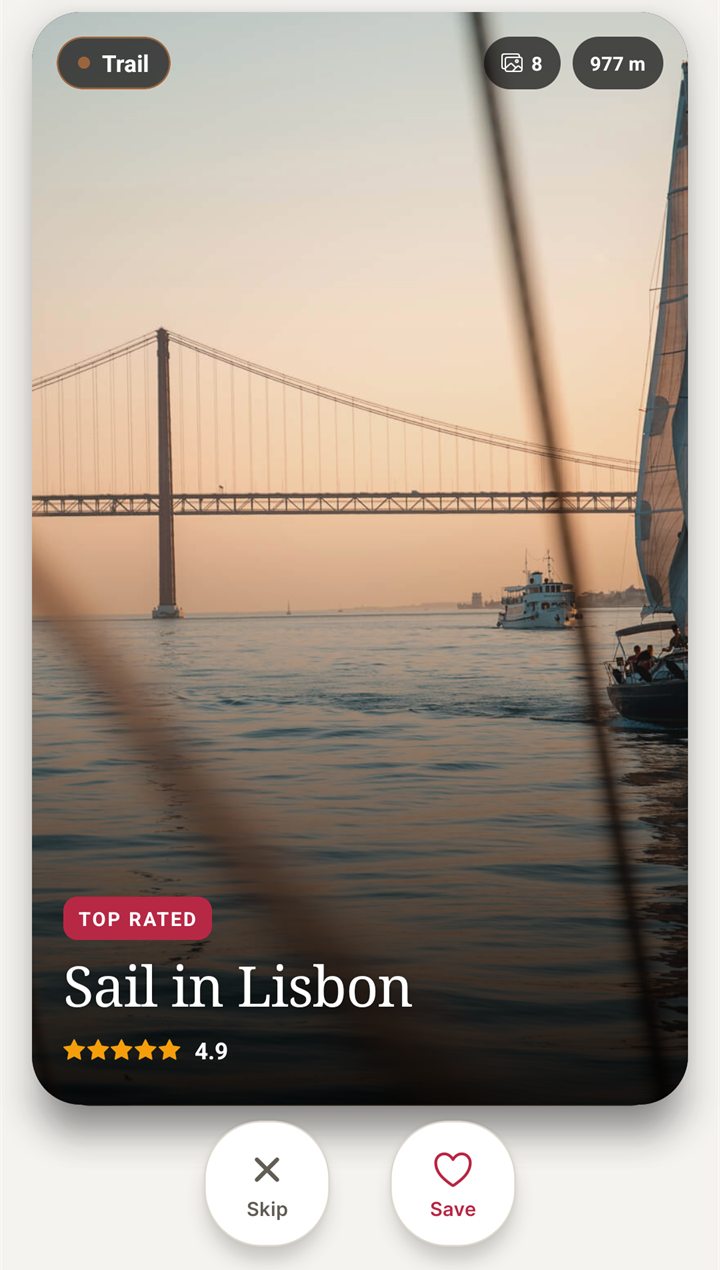
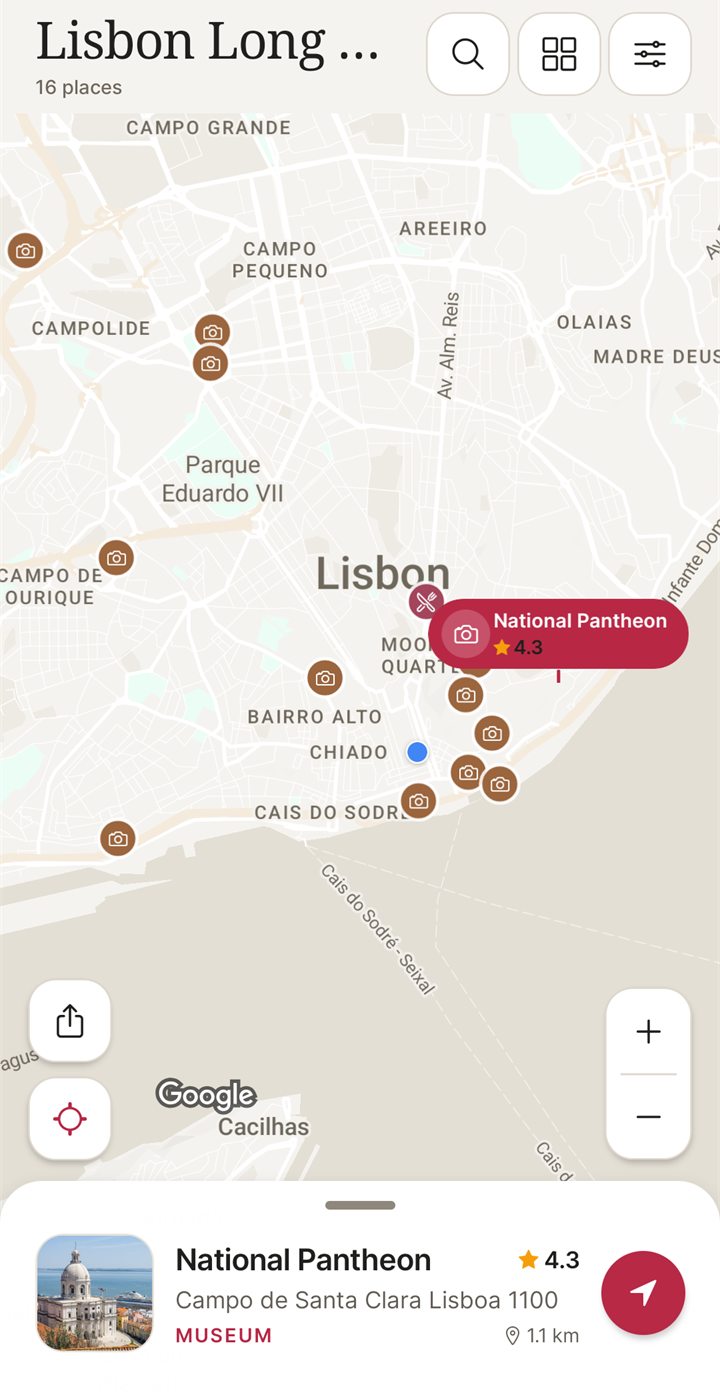
I built NomadSwipe, so weigh this section accordingly. Travel Mapper's pages describe a tool where you mostly bring the places: you type them, search for them or save them from websites, and the map and export come after. NomadSwipe (Android) starts one step earlier. It shows real places in a city as cards with category, rating, distance and opening status. You swipe right to save a place and left to skip it, and the saved places appear on a map and in a trip list you can sort by rating, distance or A to Z. One sample trip in its store listing is a long weekend in Lisbon with 16 places, all picked by swiping. A sensible split is to pick places in NomadSwipe and keep the day-by-day sheet and cost splitting in a spreadsheet tool like Travel Mapper. iPhone is coming soon.
| Job | Travel Mapper (Blue Planit) | NomadSwipe (Android) |
|---|---|---|
| Where the plan lives | A Google Sheet you own | Inside the app |
| How you find places | Type, search, or save from websites with the Chrome extension | Swipe through real place cards |
| Map | Built-in Google Map, listed as a paid feature | Saved places on a map |
| Day-by-day itinerary sheet, packing list, cost splitting | Yes, as it describes | Not described in its store listing |
| Export to Google My Maps | Yes, as it describes | Not described on the pages I read |
| Platforms | Google Sheets add-on, Chrome extension and a web app | Android today |
For the wider picture, planning a trip on a map shows the method, how to save places for a trip covers the collecting step, and apps like Google My Maps sit closest to this tool. Itinerary template apps with trial options compares nine tools. The same step-by-step format is used in how to use Wanderlog, how to use Funliday and how to use TripIt, and the best trip planner apps compared and swipe-style travel apps cover the field. For a route-first planner instead, see how to use Furkot.
Pick the places before you build the sheet
I built NomadSwipe to swipe real places in a city, save the ones you like and see them on a map. It is Android only for now.
Questions about using Travel Mapper
How do I use Travel Mapper?
Install the Travel Mapper add-on from the Google Workspace Marketplace, open a new Google Sheet and choose Extensions, then Travel Mapper, then Start Here, then Generate Template. Fill in your itinerary, add places and plot them on the map. The map, place search and Google My Maps export are premium features that come with a 7-day trial, according to Travel Mapper's own pages. I did not run the add-on.
Is Travel Mapper free?
Partly, according to Blue Planit's pricing page read on 13 Nov 2026. The itinerary template, split-costs sheet, packing and to-do lists, unlimited itineraries and the Chrome extension are listed as free. The in-sheet map, place search, drag and drop, Google My Maps export and itinerary email are listed under a First Class plan at 2 dollars a month, billed yearly. Check the page before you rely on the price.
Can I use Travel Mapper on my phone?
Its pricing FAQ says mobile planning is available through the web version of the app. You can email the itinerary to yourself, or export it to Google My Maps and open it in the Google Maps mobile app. I read no page describing a separate Travel Mapper phone app for the planner.
Why can't I generate the Travel Mapper template?
Blue Planit's support page says that if your browser is signed in to several Google accounts, the add-on attaches to your default account and Google blocks the others. It suggests reinstalling the add-on while your default account is active, or signing out of all accounts and signing back in with the account you installed it with.
Is the Travel Mapper Chrome extension separate?
Yes. The Chrome Web Store listing describes a free extension: highlight text on a web page, right-click and choose Save to Itinerary, or press Ctrl+Shift+S (Cmd+Shift+S on a Mac). Blue Planit's FAQ says it works only in Google Chrome. It saves into the Google Sheets itinerary the add-on creates.
The short version
To use Travel Mapper, install the Blue Planit add-on in Google Sheets, generate the template from Extensions, Travel Mapper, Start Here, add your places by hand, by search or with the Chrome extension, update the map, then export to Google My Maps or email the itinerary for the trip, as its own pages describe it. The template is free, and the map features are listed as paid. It mostly organizes places you have already chosen, so it mostly answers how to lay out a trip, not which places to pick.
Findings, method and sample
Sample and method. I read 9 pages on 13 Nov 2026: the Marketplace listing, the Blue Planit pricing page with its FAQ, the get started page, the support page, the permissions page, the Chrome Web Store listing and the web app's sign-in page, the Google Play listing of the other Travel Mapper app, plus the home page of tripmapper.co to tell the products apart. I took step names, paths, features and prices only from them. I did not install or run any of these products, so nothing here is a measured result or a personal experience of the product. NomadSwipe facts come from the app I built and its public Google Play listing.
- The Marketplace listing gives the start path as Extensions, Travel Mapper, Start Here, Generate Template, and says one click produces an itinerary, to-do list, packing checklist and split-costs sheet.
- The pricing page lists a free tier and a First Class tier at 2 dollars a month billed yearly; the Marketplace listing adds a 7-day free trial of the premium features.
- The pricing table's check and cancel marks do not show up as text, so I read them from the page code: every row from place search and the map down to drag and drop, custom categories, Google My Maps export, itinerary email, the mobile-friendly web app and priority support is marked First Class only.
- The FAQ says mobile planning is through the web version, an emailed itinerary or a Google My Maps export.
- The support page's multiple-account fix and its marker bug are dated January 2022, and the permissions page is dated November 2021.
- Not read, so not covered here: in-app screens and exact button labels, the YouTube demo the get started page mentions, how well the map or export works, and how long the trial really lasts for each user.
Limits: these are Blue Planit's statements about itself, not tested results, and some pages are old, so menu names and claims may have changed. The comparison with NomadSwipe is between a spreadsheet planner and a place-picking app, so it is a difference in job, not a ranking.
Sources
- Travel Mapper on Google Workspace Marketplace: https://workspace.google.com/marketplace/app/travel_mapper/412821700766 (read 13 Nov 2026)
- Blue Planit pricing and FAQ: https://blueplanit.co/pricing (read 13 Nov 2026)
- Blue Planit get started: https://blueplanit.co/get-travel-mapper (read 13 Nov 2026)
- Blue Planit web app sign-in page: https://blueplanit.co/travel-mapper (read 13 Nov 2026)
- Blue Planit Sheets add-on support: https://blueplanit.co/sheets-support (read 13 Nov 2026)
- Blue Planit permissions explained: https://blueplanit.co/travel-mapper-permissions (read 13 Nov 2026)
- Travel Mapper Chrome extension: https://chromewebstore.google.com/detail/travel-mapper-save-travel/jeegejabenlmpidohngdaafimapnkiab (read 13 Nov 2026)
- Travel Mapper - Travel Tracker on Google Play: https://play.google.com/store/apps/details?id=au.com.bingko.travelmapper&hl=en-US (read 13 Nov 2026)
- TripMapper: https://www.tripmapper.co/ (read 13 Nov 2026)
- NomadSwipe facts: the app I built and its store listing (cards, swipe, save, map, sort options, Lisbon sample trip), as recorded in the project's brand proof bank and re-read 13 Nov 2026.